Running LLMs
Timeline:
Inception
- Sept 2022: Georgi Gerganov initiated the GGML (Georgi Gerganov Machine Learning) library as a C library implementing tensor algebra with strict memory management and multi-threading capabilities. This foundation would become crucial for efficient CPU-based inference.
- Mar 2023: llama.cpp built on top of GGML with pure C/C++ with no dependencies. -> LLM execution on standard hardware without GPU requirements.
- Jun 2023: Ollama Docker-like tool for AI models, simplifying the process of pulling, running, and managing local LLMs through familiar container-style commands. It became the easiest entry point for users wanting to experiment with local models.
Standardization
- Aug 2023: GGUF format (GGML Universal Format) successor to GGML format. GGUF provided an extensible, future-proof format storing comprehensive model metadata and supporting significantly improved tokenization code.
- 2024: Multiple tools
- vLLM emerged as a high-throughput inference server optimized for serving multiple users
- GPT4All developed into a comprehensive desktop application with over 250,000 monthly active users
- LM Studio became a popular cross-platform desktop client for model management
The flow
Building the model
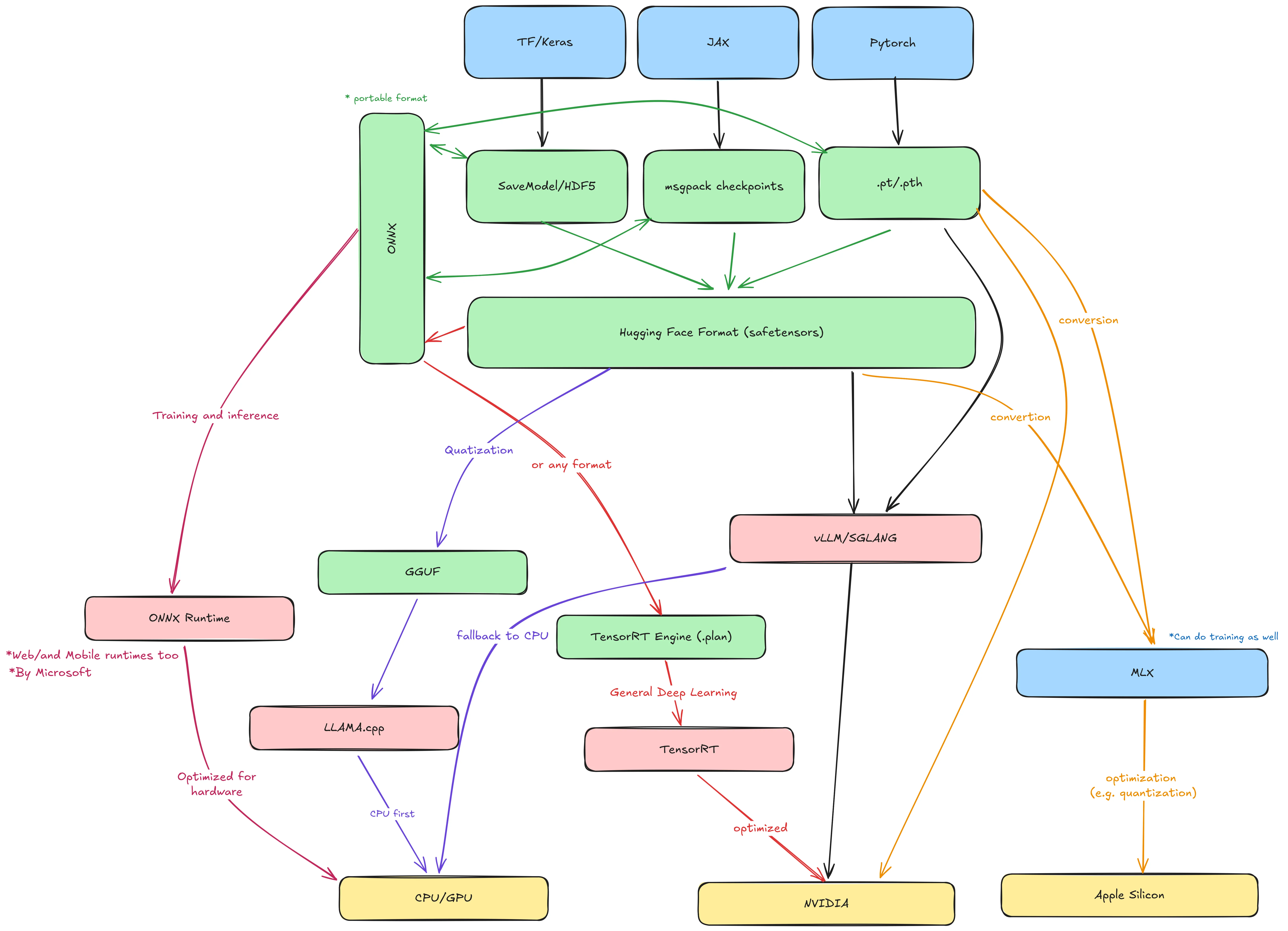
- Model is built and trained used PyTorch, Tensorflow, Jax or another framework
- The frameworks outputs the model weights:
- JAX/Flax: msgpack checkpoints (flax_model.msgpack) + config.json
- Tf/Keras: SavedModel directory (saved_model.pb + variables/) or HDF5 file (model.h5)
- PyTorch: .pt or .pth saved with
torch.save(model.state_dict(), "model.pt") - ONNX (Open Neural Network Exchange) a cross-framework intermediate format used to transfer models, it has a ONNX runtime which can run it
- The models can be converted to Hugging Face model formats
- pytorch_model.bin or model.safetensors → the weights (can be multiple shards if big).
- config.json → architecture hyperparameters (hidden size, number of layers, etc.).
- tokenizer.json, tokenizer.model, special_tokens_map.json, etc. → tokenizer files.
- generation_config.json → default generation params.
model.safetensors is a safe, zero-copy serialization format for tensors. Alternative to PyTorch’s pickle-based .bin (which can execute arbitrary code on load — unsafe). And supports other frameworks like TF and Jax. And it is convertible to GGUF and other formats and can be run by vLLM natively.
Running the models (vLLM vs llama.cpp)
- vLLM: Runs the model in HF format (Inference). It can start a inference server with OpenAI-compatible API
- The model can be converted further (compiled into) to TensorRT which is NVIDIA’s inference optimization runtime (For all DL models). It takes a model in any format (PyTorch, ONNX) and compiles it into a TensorRT engine .plan file highly optimized for Nvidia GPUs. (This is used if we are targeting Nvidia GPUs)
vLLM doesn’t use TensorRT by default (it uses its own kernel tricks), but you could use TensorRT separately.
- In Apple Silicon the model can be converted using MLX to use the Integrated Memory. MLX optimized the model for inference in Apple Silicon (quantization for example)
- Convert the model from HF format to GGUF format (Quantization).
- Run the GGUF on llama.cpp on CPU and low resource hardware.
Running the models as a user
- Create a
Modelfileto package the model a la Dockerfile.
FROM ./model-q4_k_m.gguf
PARAMETER temperature 0.7
TEMPLATE """{{ .Prompt }}"""
-
Build the model
ollama create mymodel -f Modelfileand run itollama run mymodel. -
We can push/pull the model.
-
While ollama is developer friendly/focused, there are other tools geared towards end users like
gpt4allandLM studio(GUI first, marketplace, builtin chat ui ...)
Running Local LLMs
Prerequisites
- CUDA: Application programming interface for Nvidia GPUs
- AMD ROCm is an open software stack including drivers, development tools, and APIs that enable GPU programming from low-level kernel to end-user applications.
- Intel OneApi: Same but has a different goal, trying to standardize computation over CPU and GPUs and FPGAs ...
Inference Engines

Serving Frameworks
 These are serving frameworks in the sense that they do the entire thing including compression, deployment, Serving, memory management, Caching ... While the previous category only runs the model on the hardware (with some optimization but not a fully fledged framework).
-LMDeploy: it is also a solution for running LLMs (Inference).
These are serving frameworks in the sense that they do the entire thing including compression, deployment, Serving, memory management, Caching ... While the previous category only runs the model on the hardware (with some optimization but not a fully fledged framework).
-LMDeploy: it is also a solution for running LLMs (Inference).
Dev Oriented
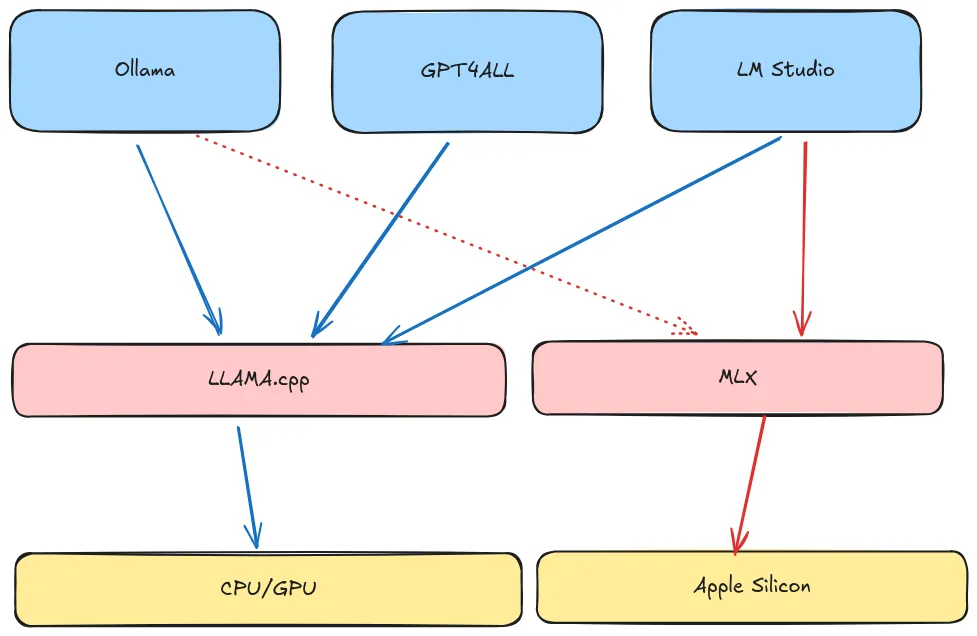
- Ollama: Uses docker like concepts to manage and run models
- LocalAI:
- It supports a lot of backends including llama.cpp, vllm, and hf transformers ...
- It support Hardware acceleration on various models.
- If I can say it is the most complete but it feels cumbersome.
- It support a declarative way to define models.
- It is container first. Run with container images | LocalAI
- mozilla-ai/llamafile: 1 executable file models (it relies on llama.cpp)
Containers
- Ramalama:
- Supports multiple transports (
ollama://hf://andoci://andModelScope://) - ramalama support 3 runtimes: ollama.cpp, vllm and mlx.
- It starts a container image with everything needed to run the model including optimizations. On run ramalama detects the GPU information and decides which image to use.
- Supports multiple transports (
- Docker:
- Same but the ai models are not standard OCI images, which make them not pull-able from ramalama
- Docker has introduced ability to run MCP servers.
GUIs
- GPT4All: uses LLama.cpp as a backend
- LM Studio: used LLama.cpp as a backend and supports MLX on Apple silicon.
- menloresearch/jan: Jan is an open source alternative to ChatGPT that runs 100% offline on your computer